Load Balancing: The Spotter of Your System
Introduction
Imagine you're in the gym, attempting a new personal record on the bench press. You don't just dive under the bar alone; you have a spotter. Their job isn't to lift the weight for you, but to ensure you remain stable, don't drop the bar, and if you start to fail, they help distribute the load so you can rack it safely.
In distributed systems, servers are the athletes lifting the heavy traffic. A Load Balancer is the spotter. It ensures no single server tries to lift 225kgs alone while others are idle. It distributes the incoming requests (the weight) across your cluster to ensure stability, availability, and prevent burnout (crashes).
[!NOTE] In today's cloud-native world, where direct traffic hits massive scale globally, load balancing is the silent hero that keeps the internet running smoothly.
The Problem: The Overeager Athlete
Without a load balancer, traffic hits your servers unpredictably.
[!TIP] Even if clients use DNS, DNS alone cannot guarantee evenly distributed traffic. Caching and TTL issues mean many users might still stampede a single outdated IP.
Imagine 10,000 users trying to connect to your service. If they all connect to Server A because they have its direct IP, Server A will buckle under the pressure and crash. Meanwhile, Server B and Server C are sitting there idle.
This leads to:
- Single Points of Failure: If the one server everyone uses goes down, the whole app is down.
- Uneven Utilization: Wasted resources on idle servers.
- Slow Performance: The overloaded server becomes a bottleneck.
We need a traffic cop—a spotter—to direct the flow.
The Solution: The Load Balancer
A Load Balancer sits between the client and the server. It accepts all incoming traffic and routes it to the best available backend server based on a specific algorithm.
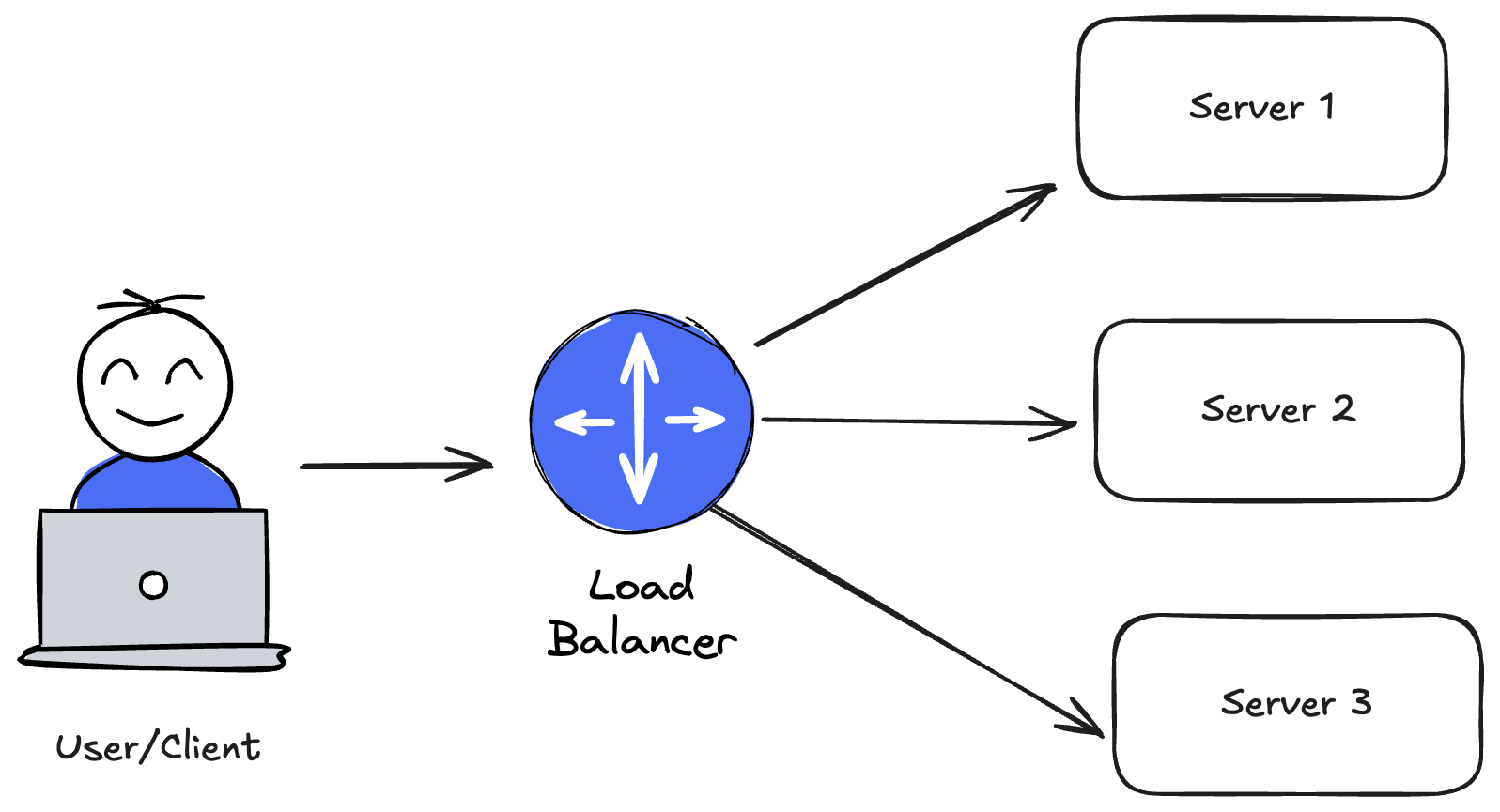
It provides:
- Availability: If
Server Acrashes, the Load Balancer stops sending it traffic and redirects toServer B. - Scalability: You can add
Server DandServer Eto the pool, and the Load Balancer will automatically start giving them work. - Security: It hides the actual IP addresses of your backend servers.
How It Decides: Algorithms
Just like a coach decides who needs more reps and who needs a break, the Load Balancer uses algorithms to distribute traffic:
1. Round Robin
The "Everyone Gets a Turn" approach. Request 1 -> Server A Request 2 -> Server B Request 3 -> Server C Request 4 -> Server A again. Good for: Servers with identical specs.
2. Weighted Round Robin
The "Strongman" approach. Server A is a beast (high CPU), so it gets weight 5. Server B is smaller, weight 1. Server A gets 5 requests for every 1 that Server B gets. Good for: Heterogeneous clusters where some servers are more powerful.
3. Least Connections
The "Who is Free?" approach. If Server A has 100 active users, and Server B has 5, the Load Balancer sends the next user to Server B. Good for: Long-lived connections where some sessions are heavier than others.
4. Least Response Time
The "Fastest Rep" approach. Used by NGINX and HAProxy. The LB chooses the server that is responding the fastest and has the fewest active pairings. Good for: Ensuring the best user experience during varying loads.
5. IP Hash
The "Sticky" approach. The user's IP determines which server they get. User X always goes to Server A. Good for: Apps that need session persistence (though it can cause uneven loading).
6. Consistent Hashing
The "Ring" approach. Servers and keys are mapped on a ring. Minimizes remapping introduction/removal of servers. Good for: Caching systems and distributed, horizontally scalable databases.
The OSI Model Context
To understand where load balancers fit, we need to look at the OSI (Open Systems Interconnection) model. It breaks down network communication into 7 abstractions.
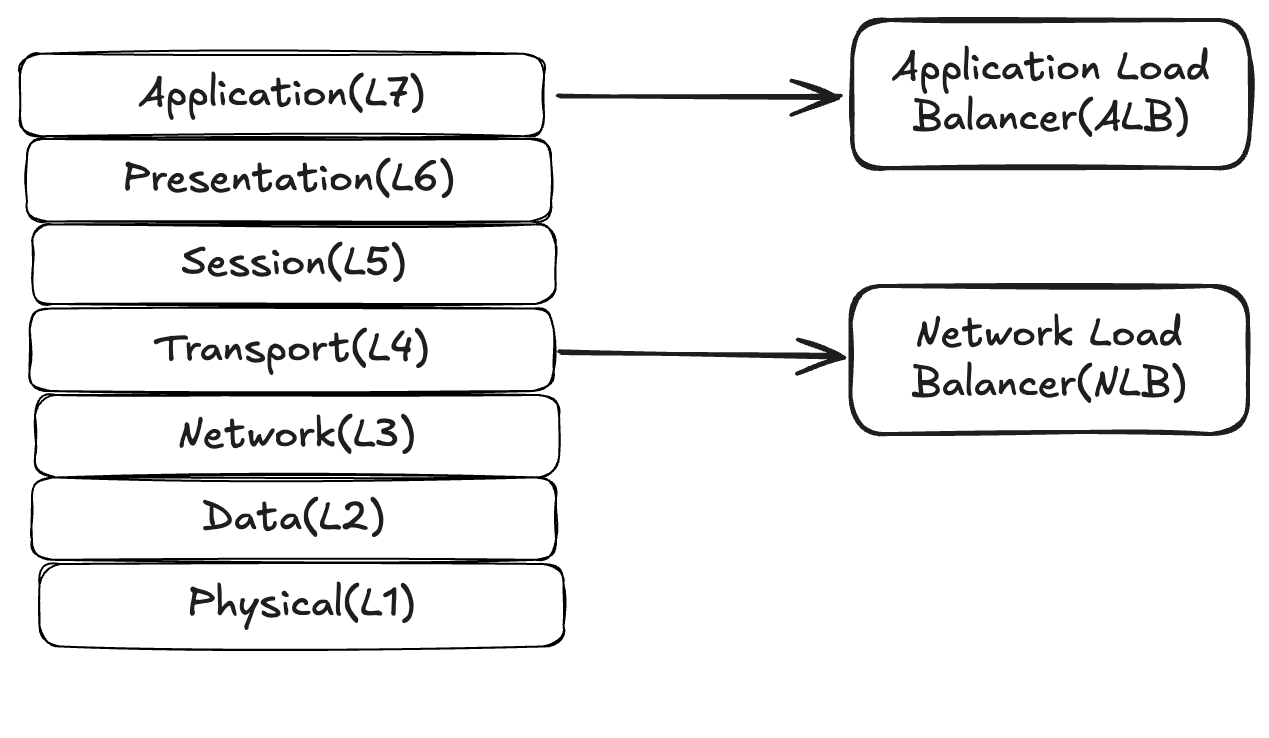
Load Balancers typically operate at:
- Layer 4 (Transport Layer): Dealing with TCP/UDP packets.
- Layer 7 (Application Layer): Dealing with HTTP requests and responses.
[!NOTE] Modern cloud load balancers (like ALB/NLB) often operate in a hybrid model where the control plane is L7-aware but data-plane is L4 or L7 depending on product.
Deep Dive: Layer 4 vs Layer 7
Choosing the right type depends on your specific needs.
Layer 4 (L4) Load Balancing
The "Efficient Traffic Cop"
How it works: It looks at the IP address and Port of incoming packets. It forwards them without inspecting the contents. Decisions: Packet from 192.168.1.50 for Port 80? Go to Server 1.
Pros:
- Extremely Fast: Minimal processing overhead.
- Secure: Can pass through encrypted traffic (TLS passthrough) without decrypting it.
- Simple: Easy to set up.
Cons:
- Dumb: Can't route based on URL, headers, or cookies.
- Limited: No WebSockets rewrite capability.
- Blind: Can't do health checks at the HTTP level (only knows if the TCP port is open).
When to use:
- You need extreme throughput (millions of requests/sec).
- You don't want the load balancer to handle SSL termination.
- You are balancing non-HTTP protocols (databases, mail servers).
Layer 7 (L7) Load Balancing
The "Intelligent Receptionist"
How it works: It terminates the connection, decrypts the traffic, and inspects the HTTP headers, URL, and Cookies.
Decisions: Request for /api/billing? Go to the Billing Service. Request from an iPhone? Go to the Mobile Farm.
Pros:
- Smart Routing: Content-based routing allows for microservices architecture.
- Advanced Features: Caching, compression, rate limiting, and A/B testing support.
Cons:
- Slower: Decrypting and inspecting takes CPU power.
- Expensive: Requires more powerful hardware/instances.
- Resource Heavy: Stateful connection termination leads to much higher memory usage.
When to use:
- Microservices (routing
/apivs/static). - SSL Termination (offloading encryption work from backend servers).
- Advanced traffic management (Canary deployments).
Fitness Parallels
- Load Balancer = The Spotter / Coach.
- Server Crash = Muscle Failure.
- Round Robin = Doing supersets (moving from station to station).
- Horizontal Scaling = Adding more specialized athletes to the team.
Real World Examples: AWS Edition
In the AWS ecosystem, the distinction between L4 and L7 is clear:
1. AWS Application Load Balancer (ALB) - Layer 7
The "Microservices Manager"
- Scenario: You have an e-commerce site with
/api/ordersand/api/products. - Role: The ALB inspects the URL. If it sees
/orders, it routes to the Order Service target group. If it sees/products, it routes to the Product Service target group. - Features: Supports HTTP/2 and WebSockets.
- Why use it: You need routing intelligence, SSL termination, and integration with AWS WAF (Web Application Firewall).
2. AWS Network Load Balancer (NLB) - Layer 4
The "Heavy Lifter"
- Scenario: You run a high-frequency trading platform handling millions of requests per second where every millisecond counts.
- Role: The NLB receives TCP packets and forwards them to backend instances with ultra-low latency. It provides a static IP address per Availability Zone (great for whitelisting).
- Features: Now supports TLS termination (a game changer).
- Why use it: You need extreme performance, support for non-HTTP protocols (like gaming UDP or MQTT), or static IPs.
3. AWS Gateway Load Balancer (GLB) - Layer 3/4
The "Security Guard"
- Scenario: You need to inspect all traffic with a fleet of firewalls.
- Role: Transparently passes traffic through 3rd party virtual appliances (IDS/IPS, Firewalls) before it hits your apps.
Deep Dive: Health Checks (The Pulse)
A load balancer is only as good as its health checks. If it sends traffic to a dead server, it has failed its primary job.
- Shallow Checks: A simple "Ping" or check if port 80 is open. Fast, but deceptive. The server might be technically "up" but the application process is frozen or the database connection is broken.
- Deep Checks: The LB requests a specific endpoint (e.g.,
/health) where the app actively checks its dependencies (DB, Cache) before returning 200 OK. - The "Flapping" Problem: A server is on the edge of failure, responding to every other check. The LB adds it, removes it, adds it... causing chaos.
- Solution: Hysteresis. Require 3 consecutive successes to add a server back, but only 2 failures to remove it.
Advanced Challenges: The Thundering Herd
When a large server crashes, the Load Balancer redistributes its traffic to the remaining healthy notes. But what happens when that server comes back online?
If the LB immediately sends it a fair share of traffic (say, 5,000 requests/sec), the cold server—with cold caches and empty connection pools—will almost certainly crash again immediately.
The Fix: Slow Start. The Load Balancer artificially throttles traffic to the new node, gradually ramping it up (warm-up period) to allow caches to fill and connections to stabilize.
Modern Architectures: Service Mesh & Client-Side LB
In massive cloud-native deployments (kubernetes), the traditional central load balancer can become a bottleneck or a single point of failure.
- Client-Side Load Balancing: The client itself (e.g., Microservice A) asks a Service Registry for a list of IPs for Microservice B, and picks one itself. No middleman.
- Service Mesh (e.g., Istio, Linkerd): A "Sidecar" proxy sits next to every single container. It handles load balancing, retries, and encryption essentially forming a distributed mesh of smart endpoints.
Conclusion
You wouldn't bench press 140kgs without a spotter. Don't run your production application without a Load Balancer. It is the critical component that turns a collection of fragile servers into a resilient, highly available system.
A few final reps to remember:
- Entry Point: The Load Balancer often acts as the trigger for Auto Scaling (add more servers when the LB is 80% full).
- Caution: Most outages in production happen due to misconfigured load balancers (wrong health checks, timeout limits). Spot carefully!